Wednesday, June 1, 2011

Could computers and robots become conscious -- if so, what happens then?

The advancements we've made in computer science and robotics, two young disciplines, are impressive. Moore's Law is a good example of how quickly things can change. Gordon Moore observed in 1965 that the number of transistors that could fit on a silicon chip an inch (2.54 centimeters) in diameter doubled every year. That's a logarithmic growth pattern. While computer scientists would adjust the observation by lengthening the amount of time it takes before we can cram more transistors onto a chip, we've still shrunk transistors down to the nanoscale.
In robotics, engineers have created machines with multiple points of articulation. Some robots have an array of sensors that can gather information about the environment, allowing the robot to maneuver through a simple obstacle course. Honda's ASIMO robot can climb stairs and run. From manufacturing to military applications, robots are making a big impact.

Though computers and robots are more advanced than ever, they're still just tools. They can be useful, particularly for tasks that would either be dangerous to humans or would take too long to complete without computer assistance. But robots and computers are unaware of their own existence and can only perform tasks for which they were programmed.
But what if they could think for themselves? It's a common theme in science fiction. Machines become self-aware, changing the dynamic between man and machine. Could it really happen?

Microsoft Robotics Studio Provides Common Ground for Robotics Innovation (press release)

PITTSBURGH (June 20, 2006) -- Today at RoboBusiness Conference and Exposition 2006, Microsoft Corp. showcased the community technology preview (CTP) of a new Windows®-based environment for academic, hobbyist and commercial developers to easily create robotic applications for a wide variety of computing platforms. In addition, early adopter companies, universities and research institutes offered demos and provided support for the new Microsoft® Robotics Studio development platform. The community technology preview of the Microsoft Robotics Studio is available for download at http://msdn.microsoft.com/robotics.
"Microsoft, together with the upcoming LEGO® MINDSTORMS® NXT, will help further amplify the impact of robotics," said Søren Lund, director of LEGO MINDSTORMS at the LEGO Group. "The MINDSTORMS robotics toolset has enjoyed a strong community of users since 1998, and the launch of our next-generation platform includes many built-in features that further the community's ability to take MINDSTORMS programming out of the box. In combination with Microsoft Robotics Studio, PC users will have a sophisticated tool that will further extend the powerful NXT hardware and software to an even wider range of developers who wish to create advanced applications for their LEGO robots."
Today's improved processors and lower-cost sensors are fueling the development of robotics applications for a broad variety of devices, from household vacuums to unmanned vehicles for search and rescue missions. Microsoft Robotics Studio provides a common development platform for robotics innovators to overcome one of their biggest remaining hurdles: the fragmentation of the robotics industry caused by today's incompatible platforms.
"Microsoft sees great potential in robotics, and we are excited to deliver our first CTP of Robotics Studio, making it easier to create robotic applications across a wide variety of hardware, users and scenarios," said Tandy Trower, general manager of the Microsoft Robotics Group at Microsoft. "We've reached out to a broad range of leading robotics companies and academics early on in the development process and are thrilled with the positive response from the community." Key features and benefits of the Microsoft Robotics Studio environment include these:

  • End-to-end robotics development platform. Microsoft Robotics Studio includes a visual programming tool, making it easy to create and debug robot applications. Robotics Studio enables developers to generate modular services for hardware and software, allowing users to interact with robots through Web-based or Windows-based interfaces. Developers can also simulate robotic applications using realistic 3-D models; Microsoft has licensed the PhysX™ engine from AGEIA™, a pioneer in hardware-accelerated physics, enabling real-world physics simulations with robot models. The PhysX simulations can also be accelerated using AGEIA hardware.
  • Lightweight services-oriented runtime. Microsoft Robotics Studio provides a lightweight services-oriented runtime. Using a .NET-based concurrency library, it makes asynchronous application development simple. The services-oriented, message-based architecture makes it simple to access the state of a robot's sensors and actuators with a Web browser, and its composable model enables the building of high-level functions using simple components and providing for reusability of code modules as well as better reliability and replaceability.
  • Scalable, extensible platform. The Microsoft Robotics Studio programming model can be applied for a variety of robot hardware platforms, enabling users to transfer their learning skills across platforms. Third parties can also extend the functionality of the platform by providing additional libraries and services. Both remote (PC-based) and autonomous (robot-based) execution scenarios can be developed using a selection of programming languages, including those in Microsoft Visual Studio® and Microsoft Visual Studio Express languages (Visual C#® and Visual Basic® .NET), JScript® and Microsoft IronPython 1.0 Beta 1, and third-party languages that conform to its services-based architecture.
Broad Industry Support Shown for Early Technical Preview
At RoboBusiness, Microsoft and several industry partners offered working models and demonstrations of Robotics Studio technology in action:

  • CoroWare Inc., an Innova Holdings company, showed its Surveyor 3000, a mobile service robot that can be remotely operated or programmed to run semiautonomously.
  • KUKA Robot Group showed a lightweight robot prototype controlled via a remote joystick service, using Microsoft Robotics Studio-based services.
  • Robosoft showed its six-wheeled robuROC6 robot, capable of autonomous navigation across difficult terrain, which highlighted how a distributed architecture, built from its robuBOX™ robotics core, could be easily controlled via the Microsoft Robotics Studio runtime.
  • RoboticsConnection featured a tracked Windows XP-based robot utilizing one of its Serializer™ .NET Robot Controller boards, via Microsoft Robotics Studio and Serializer services.
  • White Box Robotics Inc. showed a telepresence scenario featuring its 914 PC-BOT. The 914 was controlled via a Robotics Studio-driven Web-based interface, accessible remotely over a network.
"KUKA and Microsoft have enjoyed a strong relationship for many years," said Bernd Liepert, CEO of KUKA Robot Group. "With the introduction of the Robotics Studio, we see the possibilities for enabling completely new business scenarios in new market segments and for new products in our current markets."
In addition, Microsoft showed working Microsoft Robotics Studio demos from fischertechnik, LEGO Group, MobileRobots Inc., Parallax Inc. and Phidgets Inc. Before RoboBusiness, Microsoft previewed its technology and architecture with a variety of other third parties that are considering the new software for their robotics application development, including ABB, InTouch Health, Lynxmotion Inc., RoboDynamics Corp., Senseta, Trossen Robotics and Ugobe Inc., as well as with many leading universities and research institutes, including Bryn Mawr College, Cornell University, Georgia Tech, Korea Institute of Technology, Massachusetts Institute of Technology, Stanford University, University of Pennsylvania, University of Pisa, University of Southern California, and the University of Washington.
Microsoft Sponsors Carnegie Mellon Center for Innovative Robotics
Microsoft's support for advanced robotics was also in evidence at RoboBusiness when Carnegie Mellon University announced plans for a Center for Robotics Innovation. Established with funding and support from the Microsoft Robotics Group, the center will operate a Web site, http://www.cir.ri.cmu.edu, for hobbyists, academics and commercial companies to share robotics ideas, technology and software. The new center will open by late 2006.
Founded in 1975, Microsoft (Nasdaq "MSFT") is the worldwide leader in software, services and solutions that help people and businesses realize their full potential.
Microsoft, Windows, Visual Studio, Visual C#, Visual Basic and JScript are either registered trademarks or trademarks of Microsoft Corp. in the United States and/or other countries.
The names of actual companies and products mentioned herein may be the trademarks of their respective owners

Space elevator technology race launched: Beam Power Challenge to award $150,000

Space elevators are becoming a reality, and will be advanced even further once some new prototypes get off the ground at the Wirefly X Prize Cup in Las Cruces, New Mexico. The competition is this weekend.
One of the results that may spawn out of the competition is that one day, a robot will be able to climb a strong, 60,000-mile long tether to send humans or other cargo cheaply into space; a space elevator.
In order to spur the development of that technology, NASA has set up two annual competitions -- the Power Beaming and Tether Challenges. In 2005, the first of those competitions were held, but no one won either of them. NASA is hoping that the competition this weekend will provide more successful results.
In the Power Beaming Challenge, teams have to send a robotic climber up a crane-mounted tether at a minimum speed of one meter per second. As the robotic climbers ascend the distance, they will be judged by their speed and weight. The top three teams in the Power Beaming Challenge will take $150,000, $40,000 and $10,000, respectively.
One of the potential pitfalls of the Power Beaming Challenge is that the robotic climbers cannot be powered by fuel, batteries or an electrical extension cord -- because a real space elevator could not carry these things on a trip into space.
The other part of the competition -- the Tether Challenge -- aims to spark the development of lightweight materials strong enough to stretch 60,000 miles into space without breaking. Proponents of space elevators believe a thin rope of carbon nanotubes will ultimately be needed for the task.
For the Tether Challenge, a group of two-meter-long tethers will be wrapped in loops and stretched to the breaking point. The tether itself cannot weigh more than two grams and must carry 50 percent more weight than the best tether from the previous year before breaking.
These two space elevator competitions will be held annually until 2010. Even if no wins are posted this year, the competitors can try again every year until 2010

Roomba maker launches programmable robot for hobbyists, students


The robot-maker iRobot, perhaps best known for its Roomba autonomous vacuum, is giving students and hobbyists the chance to order around their own robots with the programmable "Create."
The Create is based on the aforementioned Roomba -- and its floor-mopping cousin Scooba -- and thus comes equipped with the wheels, motors and proximity sensors that keep the cleaner bot from getting stuck in corners or careening down stairs. Absent, though, are the brushes and fluid tanks used for cleaning, which leaves room for amateur robot-makers to attach arms, cameras or anything else they can imagine. While iRobot plans to sell attachments for the Create, the company expects most users will build their own add-ons.
"This isn't a toy or a plug-and-chug thing," said iRobot co-founder Helen Grenier. "It is a programmable robot for students and robot enthusiasts."
The Create is set to ship with a $129.99 price tag, and a command module with an 8-bit processor will be available separately for $59.99, according to iRobot product manager John Billington.
Even prior to its official release, iRobot engineers and university students have put the Create through its paces. Some students from the University of California, Davis have programmed their Create to pickup socks, and another Create has been programmed to open the fridge and fetch beverages. One group even found a way to turn their Create into a vehicle, albeit only for rodents. Their robot is attached to a plastic hamster ball, and when a rodent moves inside the ball, it sends navigation commands to the Create.
Grenier said of the rodent-controlled robot, "I think it was particularly creative in an ironic way."

Symet : The Rover


The Symet: An Introduction to Solar-Powered Robotics


The BEAM Symet

No Description We’re not going to attack a full robotics project until you’ve had some practice building a few simpler devices first, okay? Trust me, it’s still a fun project, and worth doing. Besides, while you’re too busy having fun, we’ll sneak some useful info into your brain. It won’t hurt…much.
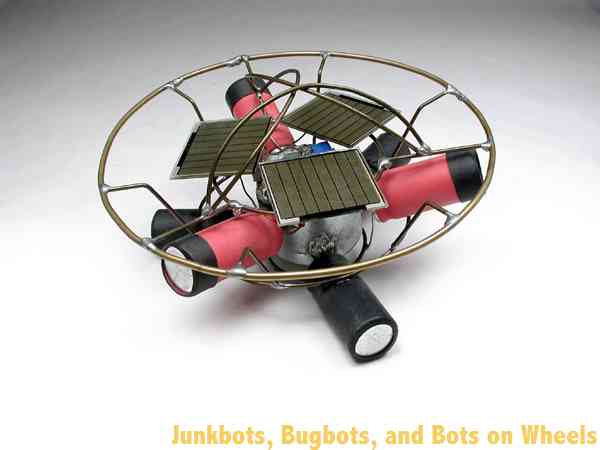
The Symet is a solar-powered BEAM device that is almost a robot. Because the device looks the same from several sides, we’ve taken the name from the word “Symmetrical,” but the extra “m” looks strange. “Symmet”—see? Doesn’t that look bizarre? This device is about as simple and self-sufficient as they get. The solar cell powers the motor; the motor moves the device; and when it bumps into something, it tilts in a new direction and keeps on going. That’s the basic operation of the Symet.

The Solarengineengine: The Key to Solar-Powered Robotics

It’s time to cover the solar aspect of BEAM robotics. As mentioned earlier, we’ll use a solar cell to power this beastie. A tiny solar cell. At best, a solar cell provides only a small fraction of the power of a regular AA battery. In fact, of all the solar energy falling on the solar cell (as light), less than 1/20 of the power gets turned into usable electricity. You will rarely be able to attach a solar cell to a motor and expect it to do anything. Fortunately, there is a family of electronic circuits that will let you convert the weak power output of a solar cell to drive the loads of a small robot. A solarengine stores the trickle of power from the solar cell, and releases it in bursts of usable energy. That means you have to wait a while until the power stores up to that usable level, but at least you’re getting some movement when it would be impossible without the solarengine. All solarengines work on the same principle: 
  1. Store the energy. 
  2. Decide when to dump the energy, then dump it. 
  3. Do it again, and again, and again…. 
The first step (store the energy) is pretty straightforward. You attach the solar cell to a capacitor or a rechargeable battery, and let it trickle the power in. If you use a small capacitor (say, 1000µF), it will take only a few seconds of lamp light to charge. If you’re using a supercap (1F), you’ll wait minutes; a rechargeable battery will take hours. The second step is a bit more complex. A circuit has several ways to decide when to dump the energy, just as you have several ways to select a flavor of ice cream. Where you may use the qualities of flavor, color, or texture to satisfy your ice cream craving, a solarengine circuit can use time, voltage, or current to decide when it’s time to activate. When the decision has been made to send the power out, a different part of the solarengine circuit blasts that power out to the rest of the robot, making it twitch, roll, walk, bleep, blink, or burp. The last step sounds simple, but it can cause headaches. It’s harder than it sounds to make sure a circuit restarts over and over and over again. You know when some days you just don’t want to get out of bed? Well, sometimes electronics circuits misbehave that way too. Fortunately, this problem shouldn’t bother you much, as the circuits we’ll use are tried, tested, and true.

Solarengine Types

Most solarengines use a voltage-based activation circuit. That means the circuit watches the volts stored in the capacitor to determine when to activate, the same way you watch a pressure gauge as you pump up a bicycle tire. When it’s high enough, you know you’re good to go, and in the case of a solarengine, that means “time to dump power.” Voltage-based solarengines are pretty simple to build, and they are quite efficient, meaning the voltage-monitoring circuit eats very little of the power coming in. This will be our solarengine of choice, and we’ll try several sub-flavors (like covered with chocolate sprinkles, or nuts, or strawberries…. Whups, wrong analogy!). The second major type of solarengine uses a built-in activation timer. Timer-based solarengines will dump whatever power they’ve stored up over so-many seconds, whether the power-storage capacitor is 1/4 full, 1/2 full, or totally full for a while already. Like clockwork, they’ll dump whatever they have at regular intervals. Solarengines of this type aren't much more complex than voltage-type solarengines, but they usually eat more power, as it takes energy to run the electronic timer accurately.
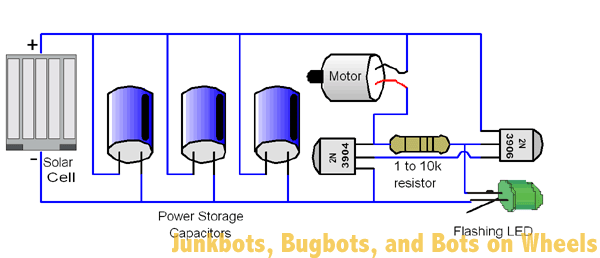
No Description Figure 1: Flashing LED solarengine schematic The third major type of solarengine watches the current flowing into the power storage capacitor to determine when to activate. It’s like when you’re inflating a bicycle tire: when the air pump can’t push any more air into the tire, the airflow reduces to nothing. This sort of solarengine watches the flow of power into the capacitor, and when the solar cell can’t push any more power into it, it dumps the power. This sort of circuit is somewhat complex, and not too many designs have been worth the difficulty of assembly. If perfected, this type of solarengine would give the best overall performance in all kind of light levels.


Symet Behavior

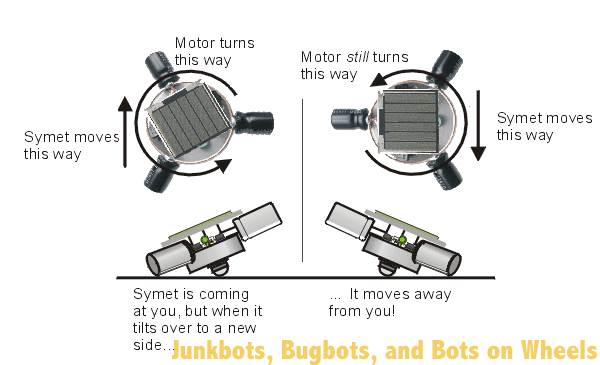
The Symet sits on the motor shaft and the edges of two capacitors, naturally sitting off-center like a toy top when it’s not spinning (see Figure 7-1). When the motor activates, it scoots the Symet forward a bit while the capacitors skid along. The neat thing about being symmetrical is that if it tilts over to a new side, the motor rotation will push the Symet in a new direction. The most important aspect of a successful Symet is proper balance. Try to make it as balanced to the center as possible, and your Symet will work equally well on any side it happens to rest on. No Description Figure 2: Symet motion explained


Symet Parts

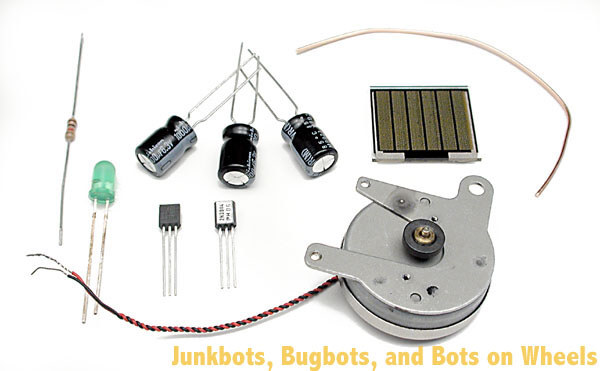
No Description Figure 3: Symet parts, ready to go Here’s where we get to the nitty-gritty of building a device. First, get parts. 
No Description 1 – Motor, the fatter and more pancake-like, the better. These rotate slower, but with more turning power.
No Description 1 – solar cell, which must be able to put out a minimum of 3.0 volts. Measure it with a voltmeter if you’re not sure.
No Description 3 – Similar capacitors, from 470µF to 4700µF, with 1000µF being darn-near ideal.
No Description 1 – Resistor, 1k to 10k. You remember your resistor color codes, right?
No Description 1 – 2N3904 or PN2222 transistor (either will do fine).
No Description 1 – 2N3906 or PN2907 transistor (again, either will do fine).
No Description 1 – Flashing LED. It must be a flashing or blinking LED—accept no substitutes. Get Active Components’ KLF-336-HD red 3-pack or Radio Shack’s 276-030/305/036 parts if you can’t find this part. Red is preferable, as it will make your solarengine activate sooner than a green or yellow one, and it will be less prone to locking up (a bad thing).
No Description 1 – Chunk of stiff structural wire; a copper paperclip is practically ideal.
No Description 1 – Wee bit of electrical wire for making electrical connections to the solar cell.
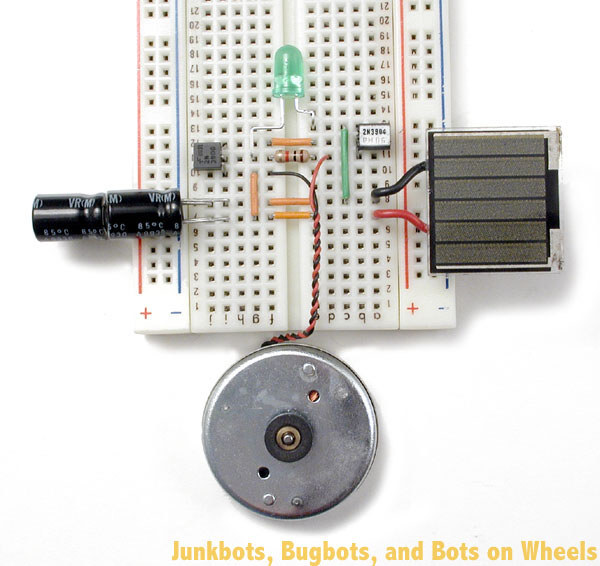
Before you start actually soldering these parts together, it’s a good idea to make absolutely sure that they work together. It’s much easier to figure out a bug in a “plug in and play” circuit than it is to implement all your recently learned “desoldering” techniques. It’s a plenty-good idea to get a hold of a breadboard, and temporarily hook up all the components you want to use, just to make sure they work. For the Symet, take a look at Figure 7-3, and copy how all the parts were put in. When you shine a light on it (a 60-watt incandescent light is good), the motor should take no longer than ten seconds to pulse. No Description Figure 4: The breadboarded Symet circuit

The Robot Geek on What Can Go Wrong with Your FLED Solarengine

  1. The flashing LED is sensitive to light! Most semiconductors that emit light have the bizarre side effect that they are also sensitive to light. A flashing LED can lock up and stop working if it’s exposed to intense light (i.e., sunlight!), so keep the flashing LED covered by the solar cell or by some black tape to ensure reliable operation. If you don’t, the Symet may pulse once, then stop working until you pass a shadow over it.
  2. If you hear a high-pitched whine from the motor (hold it up to your ear!), the solarengine is having trouble latching (turning on). Find a lower-value resistor and swap it into the solarengine.
  3. If there is no voltage in the power storage capacitor, you may have hooked up the solar cell backward to the circuit. This is a very common error.
  4. If your circuit charges your power storage capacitor up to only 0.6 volts and then stops, you most likely don’t have the motor hooked up to the solarengine. It needs the motor hooked up to charge.
  5. If you see the FLED actually flashing, then the solarengine resistor is too low for the solarengine to trigger the latch. Get a higher-value resistor, and swap it into the circuit. A typical trigger voltage for the FLED solarengine is about 3 volts for the green FLED and 2.6 volts for the red FLED. If the measured voltage on the power storage capacitor is higher than this, then the FLED is probably not getting power. If you don’t have a multimeter to test this, you can do it with a single white or blue LED. Just put this LED in parallel with the power storage capacitor (the long leg of the LED goes to capacitor ‘+’). If the LED lights up, then there is probably more than three volts in the capacitor.
  6. There is a slim chance that the solarengine can become saturated by having too much power. It will trigger once, then no more. No simple solution for this—just use a smaller solar cell.
  7. The flashing LED solarengine is sensitive to what motor is used. If it isn’t working with one motor, try a different one!


Building It!

The solarengine we’ll use with this particular project is a “flashing LED solarengine.” The two transistors and the resistor are arranged in what is called an “SCR latch”—which is the electronic name for a switch that when turned on, stays on. The flashing LED (“FLED”) acts as the finger that flips the switch to turn it on, and once it’s on, it stays on until all the power has run out. What makes a FLED such a convenient trigger is that it has a tiny, tiny chip inside that tries to make it light up every second, and every time it tries, it also tries to activate the switch circuit. Only when there’s enough power stored up in the main power storage capacitor is there enough juice to let the FLED kick the circuit into operation. What makes the FLED particularly good at its job is the fact that when it’s in the off part of its cycle, it draws almost no power, which means more power gets stored up in the capacitors
Since there isn’t much to build as a body for the Symet, let’s start by building the solarengine, as it’s the trickiest bit to build. Everything else will be easy compared to this step, so let’s tackle it first. We’re going to take special effort with the steps in this first project, showing you the graphic of what do to, and a picture of the step showing how it should actually look like after the step is performed. Subsequent projects will have just the photos showing the result of each step.
The transistors we’re using all have the same “pinout”. A pinout is the name and orientation of each lead coming out of the part. With our transistors, you can identify each of the leads by holding the transistor up, flat face towards you, pins pointing downwards. From left to right, the pins are the “emitter”, the “base” and the “collector”. What do those names mean? They describe the flow of “electron holes” through the component. The emitter and collector are like the input and output of a pipe, and the base is like the valve that controls the flow through the pipe. As for “electron holes”, that’s a term best looked up in a beginner’s guide to electronics, and is outside of the scope of this book.
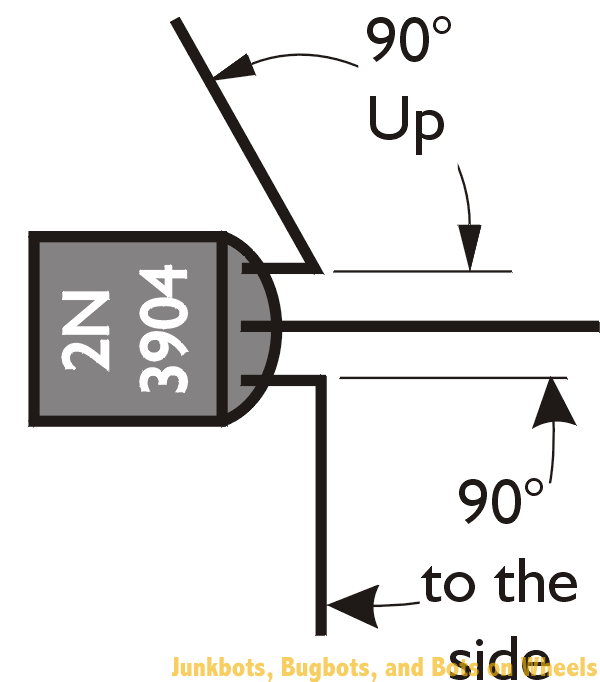
No Description Figure 5: Forming the 2N3904 / PN2222 transistor leads Take your 2N3904 / PN2222 transistor (remember, they do pretty much the same thing) and starting near the transistor body, bend it’s left lead (the emitter) 90° out to the left side. Bend the right lead (the collector) 90° directly upwards, so it’s pointing up at you. Bending these leads will make it easier to solder other components on.
Take your 2N3906 or PN2907 transistor (again, they’re functionally the same, so either will do) and starting near the transistor body, bend the left lead (the emitter) 90° out to the left side. Bend the middle leg (the base) 90° directly upwards, so it’s pointing up at you. Make sure your bends are looking like the ones in the figures! No Description Figure 6: Forming the 2N3906 (or PN2907) transistor leg
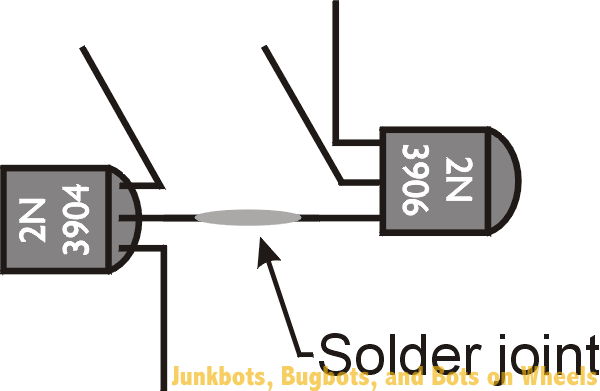
No Description Figure 7: Joining the transistors together This is the first really tricky part to free-forming the circuit. We’re going to solder the lead we didn’t modify from each transistor together. That’s the middle lead (the base) of the 2N3904 / PN2222 and the right lead (the collector) of the 2N3906 / PN2907. This is a good time to have a set of helping hands, be it mechanical set our your friends. Arrange the transistors so they’re both face-up, and their leads are overlapping so one almost totally covers the other. A bit of heat, a dab of solder, and they’ll turn into the core of your solarengine circuit.
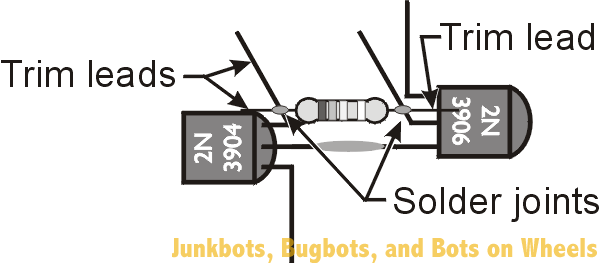
Adding the resistor isn’t terribly hard if you tilt the transistor assembly slightly away from you. It’s then a simple process to just lay the resistor across the two bent-up vertical legs, and to solder where the resistor touches the transistor legs. Resistors don’t have a front or back, so whatever way you put it in is fine.
When you’re finished soldering the two sides of the resistor to the transistor uprights, you can trim off the portions of the resistor that poke past the solder joints. Also trim off the excess vertical lead from the 2N3904 / PN2222 collector, but not from the other transistor vertical leg – we need that for attaching the FLED.
No Description Figure 8: Adding the resistor to the mix, and trimming the leads
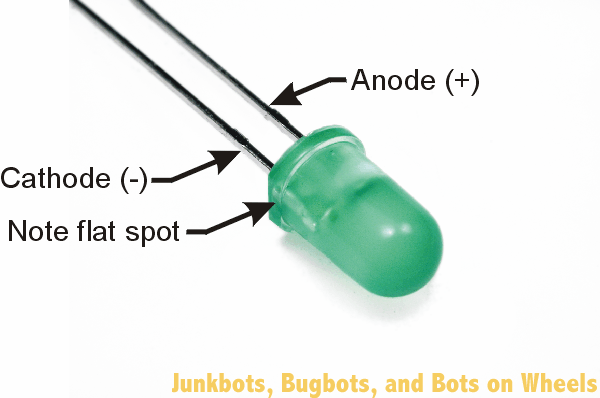
No Description Figure 9: Identifying the cathode of the Flashing LED We’re about to attach the flashing LED (FLED), but before we can do that, we need to identify the leads. Most LEDs have a flat spot near one of the legs which indicates the “cathode”. The cathode is the lead where you hook up a negative power (‘-‘) or ground connection. The other side is called the “anode”, and hooks to a positive (‘+’) power connection. Locate the flat spot on the edge of the FLED, and make note of which lead is closest to it.
Take the FLED’s cathode and bend it so you can solder it to the left lead (the emitter) of the 2N3904 / PN2222 transistor. Then solder the other lead of the FLED to the upright middle lead (the base) of the 2N3906 / PN2907 transistor, which is also soldered to the resistor.
Yeah, I know those directions seem clear as mud. Keep forging ahead and following the pictures, and you’ll be fine.
There—you’ve officially finished your first FLED solarengine circuit!
No Description Figure 10: Finishing the core circuit with the flashing LED
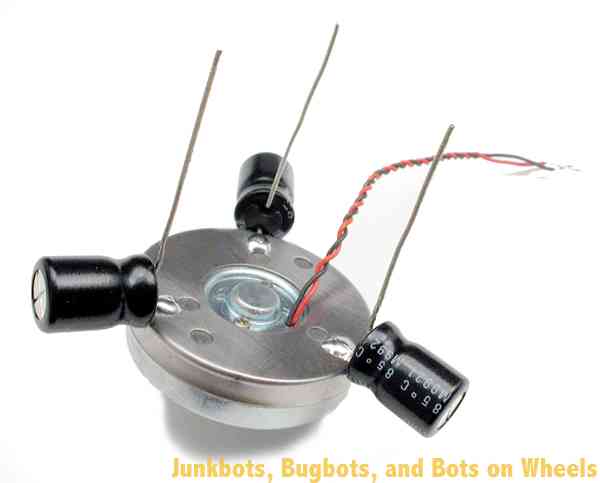
No Description Figure 11: Soldering capacitors to the motor body Time to find that big round shiny thing. Yes, we mean the motor, not your uncle’s balding head.
Let's add the power storage capacitors to the motor. Spaced equally and soldered to the motor, they will balance the Symet while storing the power for the solarengine. We’re doing this because the whole motor body will be used as one large electrical connection in the next step, and the motor body will be like one large convenient wire! Your capacitors will most likely have polarity markings (remember that the striped side is negative), so make sure you’re connecting the capacitor’s negative leg to the motor body. Bend the positive capacitor wires upward, just to get them out of the way, and clip the negative wires down so that they're just long enough to solder to the motor body. Soldering the capacitors on can be a bit tricky, because motors don’t like to be soldered to. The metal body that covers the whole motor will have to be scuffed, sanded, or filed a bit to get through the dull surface to the shiny (solderable) metal below.
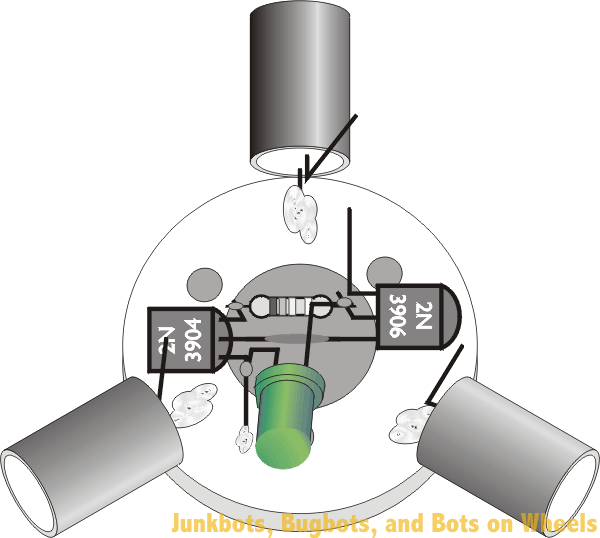
Now we’ll mount the solarengine circuitry to the top middle of the motor. This is the place you will want to solder the left leg (the emitter) of the 2N3904 / PN2222 transistor. Solder the left leg down to the motor, remembering to first scuff / sand / file a spot to solder to on the motor body before soldering, and you’ll do just fine. Remember that since the motor is a large hunk of metal that absorbs lots of heat, you’ll need to hold the soldering iron on somewhat longer before the solder will melt. No Description Figure 12: Attaching the solarengine circuit to the motor
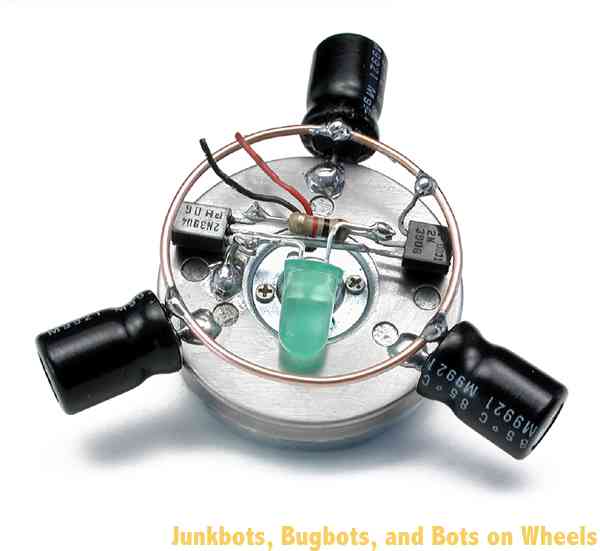
No Description Figure 13: Soldering all the capacitor “+” leads and the left (emitter) lead of the 2N3906 / PN2907 transistor to the metal ring So let’s recap: You’ve built a solarengine, attached it to the motor, and soldered three or four capacitors to the motor body. The next step is to finish making the electrical connections between all the “+” sides of the capacitors with a wire loop. This is called wiring the capacitors in parallel, which is connecting all the “+” leads together and all the “–” leads together to effectively make one big capacitor. If you have three 1000µF capacitors wired in parallel, they act as one big 3000µF capacitor.
This wire loop does more than just electrically connect the capacitors. It also acts as a bump-ring for the robot. When it bumps into something higher than the capacitor, it tips the Symet onto a new side, which makes it zoom off in a new direction.
Form the loop into as nice as a round ring as you can. Be patient, and massage it into a loop with your fingertips, and you’ll be surprised how round you can make it. This task will be especially easy if you’re the type of person who regularly mangles paperclips while talking on the telephone.
The next solder connection to make is from the left lead (the emitter) of the 2N3906 / PN2907 transistor to the same ring that the capacitor “+” legs all share.
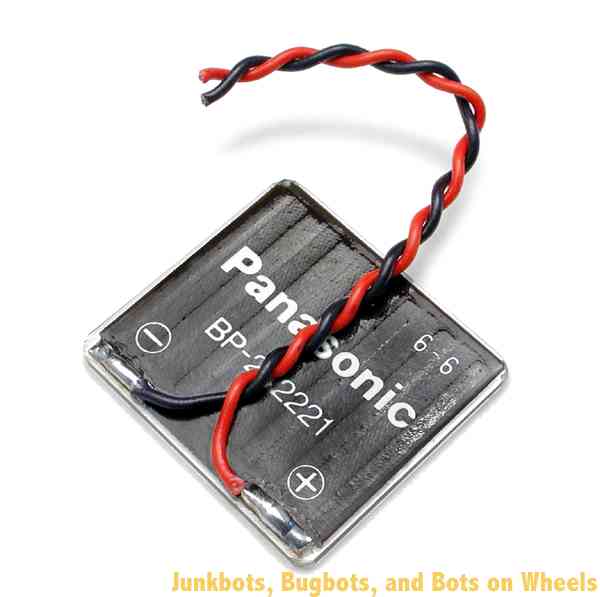
Solder short lengths of wire to the solar cell, one to each pad. If possible, use the common practice of using a red wire for positive (+) and a black wire for negative (–). Many, many years of research have shown that red wires conduct electricity best when attached to the positive terminal. If you don’t have red wire, use the next-brightest color—it won’t be as good as red wire, but it’ll do.
If you just read that last paragraph and wondered “Well, where do I have some red wire?” don’t worry about it—we’re pulling your leg. Color-coding your wiring is simply a good way to identify what wire carries what sort of signal. Red and black are usually reserved for power wires.
Make absolutely sure you glue the wires down to the back of the solar cell after you’re done soldering them on. The connections to the solar cell are usually quite fragile and will rip right off if an ant trips over them. Well, they’re not that fragile, but still, the connections are weak enough you should make sure to glue the wire down after soldering. Use hot glue, or even tape, but use something to secure the wires down. It’s a good procedure to follow on any solar cell.
No Description Figure 14: Soldering and gluing wires to the solar cell
No Description Figure 15: Soldering the solar cell to the Symet You’re getting close to completion—just have to connect the motor and the solar cell, and your Symet should leap to life, do a song and dance, and throw confetti in the air. Either that, or it should occasionally twitch, moving in one direction until it bumps into something.
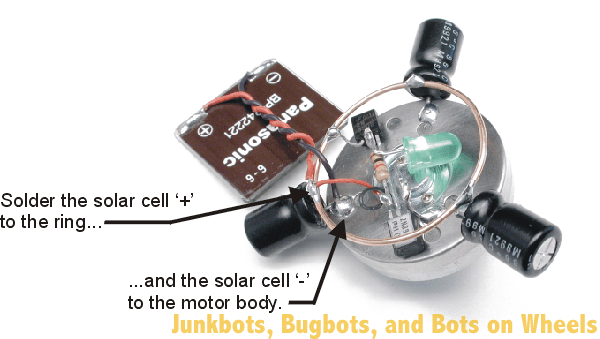
Solder the red (+) wire from the solar cell to the connecting ring that joins all the capacitor “+” leads together. The black wire from the solar cell gets connected to the motor body. You can cheat a bit here, and solder this black wire to one of the same spots you did earlier for the capacitor “–” connections.
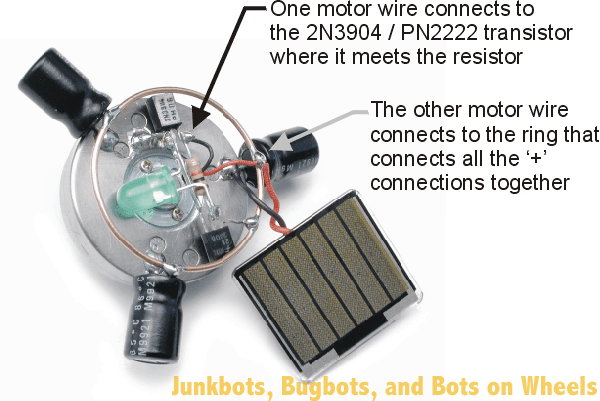
One of the motor wires gets soldered to the left lead (collector) of the 2N3904 / PN2222 transistor, and the other wire gets soldered to the capacitor connecting ring. It doesn’t matter much which wire connects where, as it only will change the direction of motor rotation, and since this is a symmetrical robot, it doesn’t have any effect on how the Symet moves. No Description Figure 16: Soldering the motor wire connections
If your Symet twitches after lying in the light for a few seconds, you’re ready to hot-glue the solar cell down to the top of the solarengine circuit. If it isn’t…well, it’s time to go back to the troubleshooting section to see what could be the problem. With “freeform” circuits, you run the risk of making accidental electrical connections because there are so many bare wires close together. Make sure you don’t smoosh wires or component leads together accidentally!
 

Care and Feeding of Your Symet

Like most solar-powered BEAM critters, it’s best kept in a pen with a hard, flat surface and walls high enough to keep it contained. Symets are cool little devices that love to ricochet around their environment, so they make great self-mobile plants for any robot display area.
If you find that your Symet isn’t quite tipping over enough to keep it out of trouble, try adding a second, larger ring (it doesn’t have to replace the one you already soldered in to the capacitors), and add a plastic sleeve to the motor shaft to add traction. At your local electronics outlet, you’ll find neat material called heat-shrink tubing that once heated, shrinks down in size. This stuff is ideal for making friction sleeves on motors. In a pinch, cut a 1/4-inch slice of pencil eraser and press it on the motor shaft as a friction wheel. Another technique is to use a blob of hot glue on the end of the motor shaft. It works well but tends to leave little plastic streaks on the surface of your robot pen.
No Description Figure 17: “Behemoth,” the monster Symet by Grant McKee Symets can be built in many sizes and configurations. One of the largest ever built is “Behemoth,” by Grant McKee. This monster measures 14cm (5.5”) across, uses a high-quality cassette deck motor, is powered by 16.5 volts from three solar cells and travels 15cm (6”) in a burst. McKee has plans for an even bigger that should be able to survive outdoors in a grassy backyard!
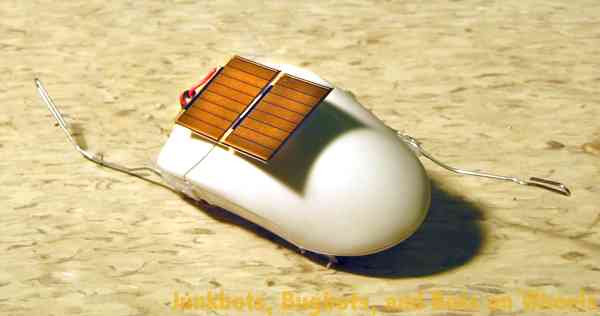
Another interesting Symet was built at a BEAM workshop in 2002 by Adam and Zachary Aronson. This Symet was fit inside a computer mouse body, and has four coaster wheels on the bottom. By having the drive motor in the middle pointing straight down and two coaster wheels on each side, this Symet can move forwards and backwards. The paperclip on each end of the mouse is designed to tilt the Symet to it’s other side, making it scurry away from whatever hit the paperclip. No Description Figure 18: The Aronson mouse Symet
Experiment with your devices—since you built it, you’re the best person to make modifications!


What Is A Transistor?????


In electronics, a transistor is a semiconductor device commonly used to amplify or switch electronic signals. A transistor is made of a solid piece of a semiconductor material, with at least three terminals for connection to an external circuit. A voltage or current applied to one pair of the transistor's terminals changes the current flowing through another pair of terminals. Because the controlled (output) power can be much more than the controlling (input) power, the transistor provides amplification of a signal.

The transistor is the fundamental building block of modern electronic devices, and is used in radio, telephone, computer and other electronic systems. The transistor is often cited as being one of the greatest achievements in the 20th century, and some consider it one of the most important technological breakthroughs in human history. Some transistors are packaged individually but most are found in integrated circuits.  ;D ;D ;D

Amplifiers


In normal cases there are mainly two kinds of amplifiers.
1) Signal amplifiers    2) Power amplifiers
1) Signal amplifiers : usually increases, the amplitude of a signal. The relationship of the input to the output of an amplifier—usually expressed as a function of the input frequency—is called the transfer function of the amplifier, and the magnitude of the transfer function is termed the gain.

In popular use, the term usually describes an electronic amplifier, in which the input "signal" is usually voltage or current. In audio applications, amplifiers operate loudspeakers used in PA systems to make the human voice louder or play recorded music. Amplifiers may be classified according to the input (source) they are designed to amplify (such as a guitar amplifier, to perform with an electric guitar), the device they are intended to drive (such as a headphone amplifier), the frequency range of the signals (Audio, IF, RF, and VHF amplifiers, for example), whether they invert the signal (inverting amplifiers and non-inverting amplifiers), or the type of device used in the amplification (valve or tube amplifiers, FET amplifiers, etc.).

2) Power amplifiers : The term "power amplifier" is a relative term with respect to the amount of power delivered to the load and/or sourced by the supply circuit. In general a power amplifier is designated as the last amplifier in a transmission chain (the output stage) and is the amplifier stage that typically requires most attention to power efficiency. Efficiency considerations lead to various classes of power amplifier

Amplifiers are important building blocks of almost every electronic system.  8)

Ultrasonic movement detector


The ultrasonic movement detector is used to detect any movement within the range of the instrument. The ultrasonic waves are longitudinal waves traveling through a medium. The ultrasonic waves are not audible to human ears. Ultrasonic are sound waves which have frequency greater than 20 kHz they have shorter wavelength so they are diffracted negligibly and so they can travel over long distances. They travel as highly directional beam, and without appreciable loss of energy.

The ultrasonic waves are transmitted to the surroundings by the transmitter is received by the receiver transducer, the received ultrasonic waves result a respective dc voltage level from the receiver preamplifier. When a motion is occurred in the path of the ultrasonic wave, an irregular voltage is got from the pre-amplifier and an alarm is activated indicate that a movement is happened. This is the working principle of the ultrasonic movement detector. The ultrasonic movement detector is very sensitive to small movements also.


The basic organization of the ultrasonic movement detector can be shown as below:
Transmitter:
40 kHz oscillator – ultrasonic transmitter driver – 40khz ultrasonic transmitter crystal
Receiver:
40 kHz receiver crystal – preamplifier – negative peak detector – amplifier – window detector – monostable multivibrator – alarm
System description

The Ultrasonic movement detector have basically four blocks namely, ultrasonic transmitter, ultrasonic receiver, decision circuit and alarm. All these blocks are supposed to be on the same PCB (printed circuit board).
Ultrasonic transmitter:

The 40 kHz crystal oscillator connected to a 40 kHz ultrasonic sound producing component constitute the transmitter block. The ultrasonic transmitter driver circuit can be a 40 kHz crystal controlled relaxation oscillator built around a 4049 hex inverter.

The Ultrasonic transmitter block provides sustained 40 kHz ultrasonic sound waves into the surroundings.
Ultrasonic receiver:

The matched pair ultrasonic receiver transducer and the pre-amplifier together forms the ultrasonic receiver section of the movement detector.

The 40 kHz ultrasonic receiver transducer pick up the ultrasonic waves produced by the transmitter of the system and the pre-amplifier outputs a voltage signal modulated by the emf (electromotive force) generated at the terminals of the ultrasonic receiver transducer.
Decision circuit:

The decision circuit is the section of the ultrasonic movement detector which takes the decision on the received signal whether a movement is occurred or not. A negative peak detector, an amplifier, a window detector and a monostable multivibrator together forms the decision circuit.

The negative peak detector (envelope detector) tracks the negative peak voltage levels from the pre-amplifier (The output of the negative peak detector will be a constant voltage level when there is no movement within the range of the system.). The output of the negative peak detector is amplified and fed to the window detector to check if any movement occurred is sufficient to produce an alarm. The monostable multivibrator holds the trigger signal to the buzzer driver up to a preset time if the window detector output is positive.
Alarm:

A buzzer driver amplifier and the buzzer constitute the alarm section. The buzzer will sound as long as the output of the monostable multivibrator is “HIGH”.

The reader is supposed to realize the circuit by self.
Extra notes:
» The ultrasonic crystals must be matched type. (The crystals are available in the market as Tx-Rx pairs)
» Select the crystal with frequency as 40 kHz.
» The 40 kHz oscillator can be a crystal oscillator realized using IC4049 hex inverter.
» The ultrasonic transmitter crystal and the ultrasonic receiver crystal are supposed to be on the same PCB and both the crystals must be installed on the same side of the PCB and must be close to each other. The crystals should face towards the same side also.

Charge velocity and velocity of field propagation

Charge velocity:
The speed with which the charge drifts in a conductor is called the velocity of charge. This velocity is quite low, typically a fraction of a meter per second!

Velocity of field propagation:
Velocity of electric field propagation is the speed with which the effect of e.m.f. is experienced at all parts of the conductor resulting in the flow of current. This velocity is independent of current and voltage and has high but constant value of nearly 3*108 m/s, which is the speed of light in vacuum!

Modulation

Modulation may be defined as a process by which some characteristic of a signal known as carrier is varied according to the instantaneous value of another signal known as modulating signal. The signals containing the intelligence or information to be transmitted are called modulating signals or baseband signals. The carrier frequency is greater than the modulating frequencies and the signal result from the process of modulation is known as modulated signals.

Modulation may be of two types; 1) Continuous wave modulation (CW) and 2) Pulse modulation. If the carrier waveform is continuous in nature then the modulation process is called CW modulation and if the carrier is a pulse type waveform, then the modulation is called Pulse modulation.

Examples of CW modulation – amplitude modulation and angle modulation

Examples of pulse modulation – Pulse amplitude modulation (PAM), Pulse width modulation (PWM), and Pulse code modulation (PCM)