| |||||||||||||

| Most solarengines use a voltage-based activation circuit. That means the circuit watches the volts stored in the capacitor to determine when to activate, the same way you watch a pressure gauge as you pump up a bicycle tire. When it’s high enough, you know you’re good to go, and in the case of a solarengine, that means “time to dump power.” Voltage-based solarengines are pretty simple to build, and they are quite efficient, meaning the voltage-monitoring circuit eats very little of the power coming in. This will be our solarengine of choice, and we’ll try several sub-flavors (like covered with chocolate sprinkles, or nuts, or strawberries…. Whups, wrong analogy!). The second major type of solarengine uses a built-in activation timer. Timer-based solarengines will dump whatever power they’ve stored up over so-many seconds, whether the power-storage capacitor is 1/4 full, 1/2 full, or totally full for a while already. Like clockwork, they’ll dump whatever they have at regular intervals. Solarengines of this type aren't much more complex than voltage-type solarengines, but they usually eat more power, as it takes energy to run the electronic timer accurately. | ||||||||||||||||||||
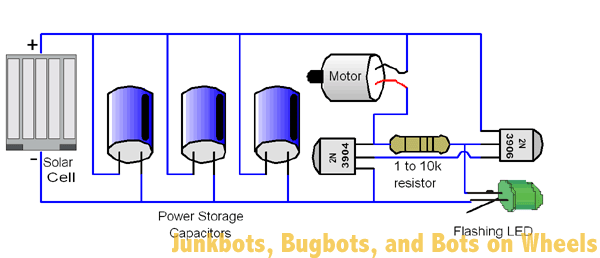 Figure 1: Flashing LED solarengine schematic Figure 1: Flashing LED solarengine schematic | The third major type of solarengine watches the current flowing into the power storage capacitor to determine when to activate. It’s like when you’re inflating a bicycle tire: when the air pump can’t push any more air into the tire, the airflow reduces to nothing. This sort of solarengine watches the flow of power into the capacitor, and when the solar cell can’t push any more power into it, it dumps the power. This sort of circuit is somewhat complex, and not too many designs have been worth the difficulty of assembly. If perfected, this type of solarengine would give the best overall performance in all kind of light levels. | |||||||||||||||||||
Symet Behavior | ||||||||||||||||||||
| The Symet sits on the motor shaft and the edges of two capacitors, naturally sitting off-center like a toy top when it’s not spinning (see Figure 7-1). When the motor activates, it scoots the Symet forward a bit while the capacitors skid along. The neat thing about being symmetrical is that if it tilts over to a new side, the motor rotation will push the Symet in a new direction. The most important aspect of a successful Symet is proper balance. Try to make it as balanced to the center as possible, and your Symet will work equally well on any side it happens to rest on. | 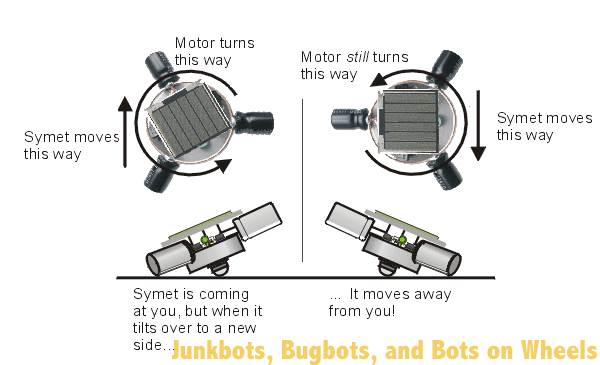 Figure 2: Symet motion explained Figure 2: Symet motion explained | |||||||||||||||||||
Symet Parts | ||||||||||||||||||||
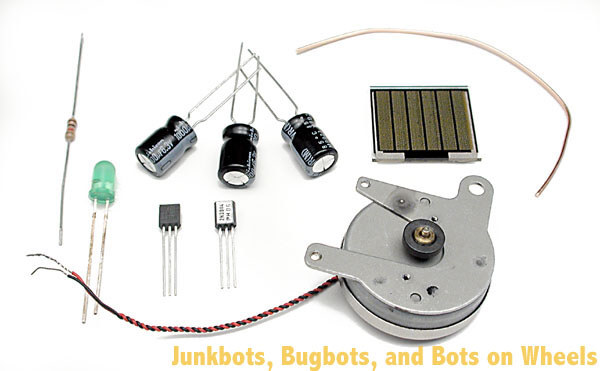 Figure 3: Symet parts, ready to go Figure 3: Symet parts, ready to go | Here’s where we get to the nitty-gritty of building a device. First, get parts.
| |||||||||||||||||||
| Before you start actually soldering these parts together, it’s a good idea to make absolutely sure that they work together. It’s much easier to figure out a bug in a “plug in and play” circuit than it is to implement all your recently learned “desoldering” techniques. It’s a plenty-good idea to get a hold of a breadboard, and temporarily hook up all the components you want to use, just to make sure they work. For the Symet, take a look at Figure 7-3, and copy how all the parts were put in. When you shine a light on it (a 60-watt incandescent light is good), the motor should take no longer than ten seconds to pulse. | 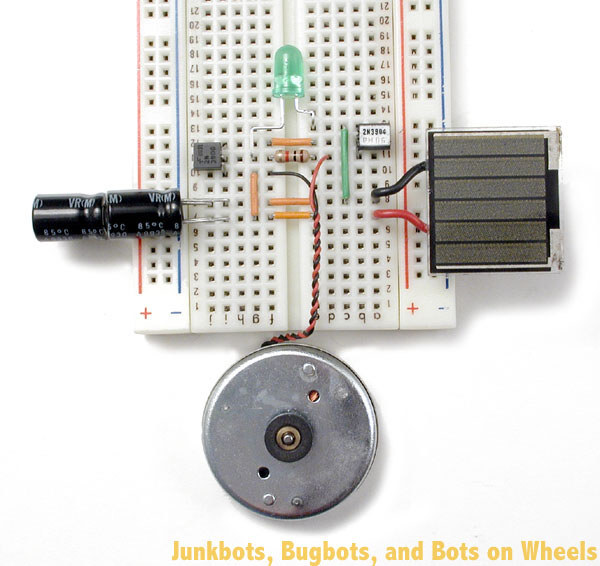 Figure 4: The breadboarded Symet circuit Figure 4: The breadboarded Symet circuit | |||||||||||||||||||
| ||||||||||||||||||||

Building It! | ||
| The solarengine we’ll use with this particular project is a “flashing LED solarengine.” The two transistors and the resistor are arranged in what is called an “SCR latch”—which is the electronic name for a switch that when turned on, stays on. The flashing LED (“FLED”) acts as the finger that flips the switch to turn it on, and once it’s on, it stays on until all the power has run out. What makes a FLED such a convenient trigger is that it has a tiny, tiny chip inside that tries to make it light up every second, and every time it tries, it also tries to activate the switch circuit. Only when there’s enough power stored up in the main power storage capacitor is there enough juice to let the FLED kick the circuit into operation. What makes the FLED particularly good at its job is the fact that when it’s in the off part of its cycle, it draws almost no power, which means more power gets stored up in the capacitors Since there isn’t much to build as a body for the Symet, let’s start by building the solarengine, as it’s the trickiest bit to build. Everything else will be easy compared to this step, so let’s tackle it first. We’re going to take special effort with the steps in this first project, showing you the graphic of what do to, and a picture of the step showing how it should actually look like after the step is performed. Subsequent projects will have just the photos showing the result of each step. The transistors we’re using all have the same “pinout”. A pinout is the name and orientation of each lead coming out of the part. With our transistors, you can identify each of the leads by holding the transistor up, flat face towards you, pins pointing downwards. From left to right, the pins are the “emitter”, the “base” and the “collector”. What do those names mean? They describe the flow of “electron holes” through the component. The emitter and collector are like the input and output of a pipe, and the base is like the valve that controls the flow through the pipe. As for “electron holes”, that’s a term best looked up in a beginner’s guide to electronics, and is outside of the scope of this book. | ||
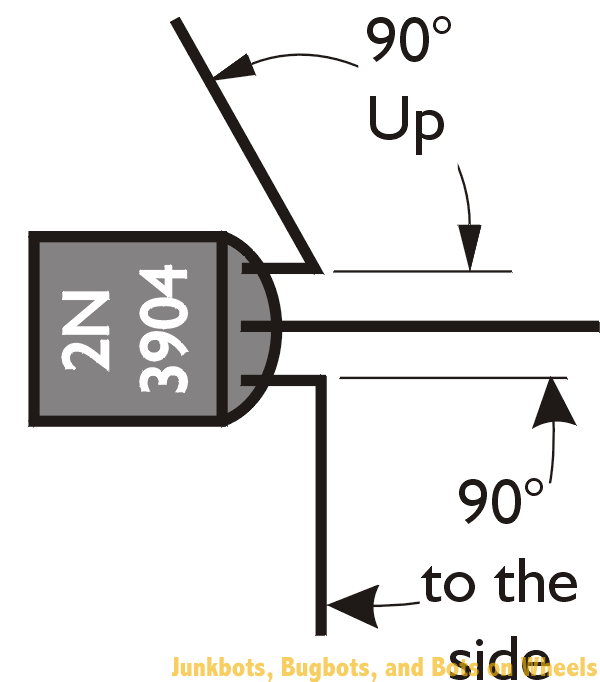 Figure 5: Forming the 2N3904 / PN2222 transistor leads Figure 5: Forming the 2N3904 / PN2222 transistor leads | Take your 2N3904 / PN2222 transistor (remember, they do pretty much the same thing) and starting near the transistor body, bend it’s left lead (the emitter) 90° out to the left side. Bend the right lead (the collector) 90° directly upwards, so it’s pointing up at you. Bending these leads will make it easier to solder other components on. | |
| Take your 2N3906 or PN2907 transistor (again, they’re functionally the same, so either will do) and starting near the transistor body, bend the left lead (the emitter) 90° out to the left side. Bend the middle leg (the base) 90° directly upwards, so it’s pointing up at you. Make sure your bends are looking like the ones in the figures! |  Figure 6: Forming the 2N3906 (or PN2907) transistor leg Figure 6: Forming the 2N3906 (or PN2907) transistor leg | |
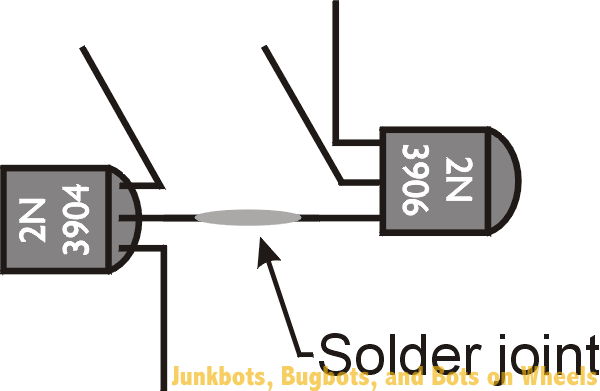 Figure 7: Joining the transistors together Figure 7: Joining the transistors together | This is the first really tricky part to free-forming the circuit. We’re going to solder the lead we didn’t modify from each transistor together. That’s the middle lead (the base) of the 2N3904 / PN2222 and the right lead (the collector) of the 2N3906 / PN2907. This is a good time to have a set of helping hands, be it mechanical set our your friends. Arrange the transistors so they’re both face-up, and their leads are overlapping so one almost totally covers the other. A bit of heat, a dab of solder, and they’ll turn into the core of your solarengine circuit. | |
| Adding the resistor isn’t terribly hard if you tilt the transistor assembly slightly away from you. It’s then a simple process to just lay the resistor across the two bent-up vertical legs, and to solder where the resistor touches the transistor legs. Resistors don’t have a front or back, so whatever way you put it in is fine. When you’re finished soldering the two sides of the resistor to the transistor uprights, you can trim off the portions of the resistor that poke past the solder joints. Also trim off the excess vertical lead from the 2N3904 / PN2222 collector, but not from the other transistor vertical leg – we need that for attaching the FLED. | 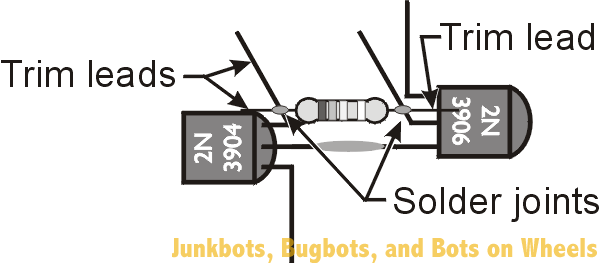 Figure 8: Adding the resistor to the mix, and trimming the leads Figure 8: Adding the resistor to the mix, and trimming the leads | |
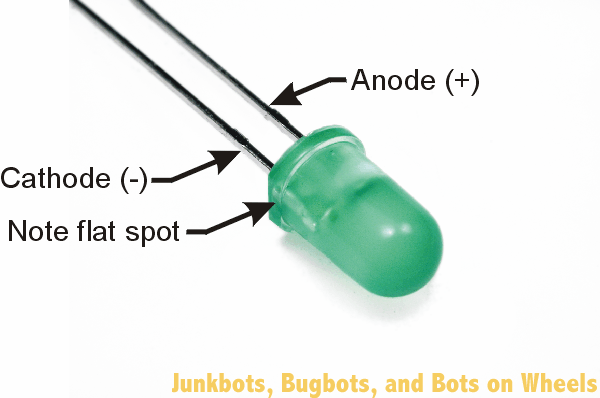 Figure 9: Identifying the cathode of the Flashing LED Figure 9: Identifying the cathode of the Flashing LED | We’re about to attach the flashing LED (FLED), but before we can do that, we need to identify the leads. Most LEDs have a flat spot near one of the legs which indicates the “cathode”. The cathode is the lead where you hook up a negative power (‘-‘) or ground connection. The other side is called the “anode”, and hooks to a positive (‘+’) power connection. Locate the flat spot on the edge of the FLED, and make note of which lead is closest to it. | |
| Take the FLED’s cathode and bend it so you can solder it to the left lead (the emitter) of the 2N3904 / PN2222 transistor. Then solder the other lead of the FLED to the upright middle lead (the base) of the 2N3906 / PN2907 transistor, which is also soldered to the resistor. Yeah, I know those directions seem clear as mud. Keep forging ahead and following the pictures, and you’ll be fine. There—you’ve officially finished your first FLED solarengine circuit! |  Figure 10: Finishing the core circuit with the flashing LED Figure 10: Finishing the core circuit with the flashing LED | |
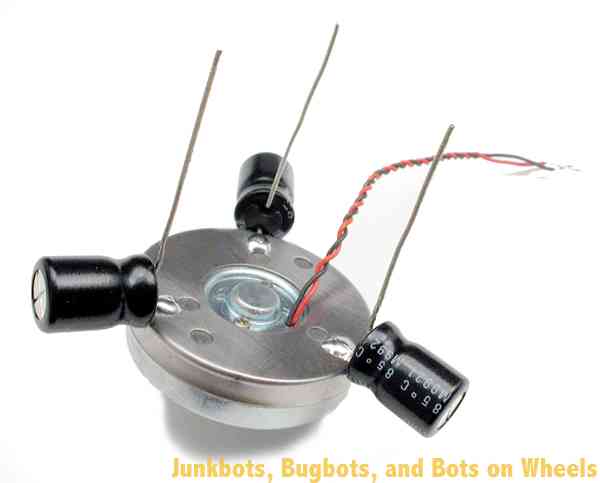 Figure 11: Soldering capacitors to the motor body Figure 11: Soldering capacitors to the motor body | Time to find that big round shiny thing. Yes, we mean the motor, not your uncle’s balding head. Let's add the power storage capacitors to the motor. Spaced equally and soldered to the motor, they will balance the Symet while storing the power for the solarengine. We’re doing this because the whole motor body will be used as one large electrical connection in the next step, and the motor body will be like one large convenient wire! Your capacitors will most likely have polarity markings (remember that the striped side is negative), so make sure you’re connecting the capacitor’s negative leg to the motor body. Bend the positive capacitor wires upward, just to get them out of the way, and clip the negative wires down so that they're just long enough to solder to the motor body. Soldering the capacitors on can be a bit tricky, because motors don’t like to be soldered to. The metal body that covers the whole motor will have to be scuffed, sanded, or filed a bit to get through the dull surface to the shiny (solderable) metal below. | |
| Now we’ll mount the solarengine circuitry to the top middle of the motor. This is the place you will want to solder the left leg (the emitter) of the 2N3904 / PN2222 transistor. Solder the left leg down to the motor, remembering to first scuff / sand / file a spot to solder to on the motor body before soldering, and you’ll do just fine. Remember that since the motor is a large hunk of metal that absorbs lots of heat, you’ll need to hold the soldering iron on somewhat longer before the solder will melt. | 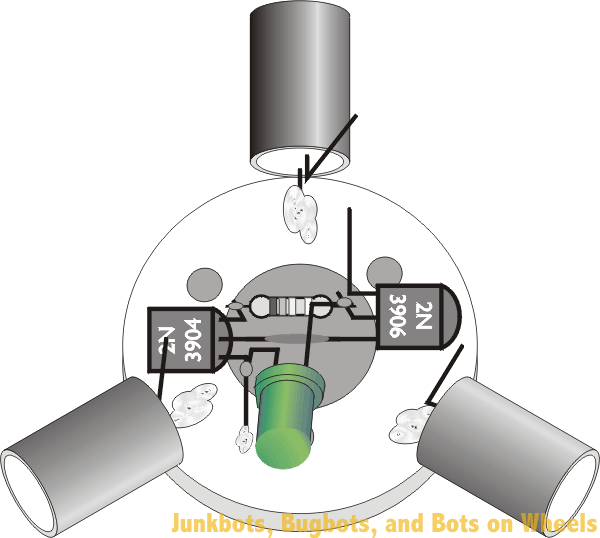 Figure 12: Attaching the solarengine circuit to the motor Figure 12: Attaching the solarengine circuit to the motor | |
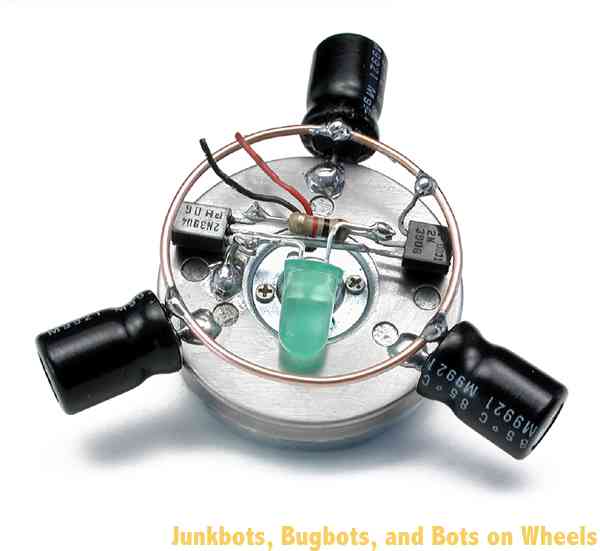 Figure 13: Soldering all the capacitor “+” leads and the left (emitter) lead of the 2N3906 / PN2907 transistor to the metal ring Figure 13: Soldering all the capacitor “+” leads and the left (emitter) lead of the 2N3906 / PN2907 transistor to the metal ring | So let’s recap: You’ve built a solarengine, attached it to the motor, and soldered three or four capacitors to the motor body. The next step is to finish making the electrical connections between all the “+” sides of the capacitors with a wire loop. This is called wiring the capacitors in parallel, which is connecting all the “+” leads together and all the “–” leads together to effectively make one big capacitor. If you have three 1000µF capacitors wired in parallel, they act as one big 3000µF capacitor. This wire loop does more than just electrically connect the capacitors. It also acts as a bump-ring for the robot. When it bumps into something higher than the capacitor, it tips the Symet onto a new side, which makes it zoom off in a new direction. Form the loop into as nice as a round ring as you can. Be patient, and massage it into a loop with your fingertips, and you’ll be surprised how round you can make it. This task will be especially easy if you’re the type of person who regularly mangles paperclips while talking on the telephone. The next solder connection to make is from the left lead (the emitter) of the 2N3906 / PN2907 transistor to the same ring that the capacitor “+” legs all share. | |
| Solder short lengths of wire to the solar cell, one to each pad. If possible, use the common practice of using a red wire for positive (+) and a black wire for negative (–). Many, many years of research have shown that red wires conduct electricity best when attached to the positive terminal. If you don’t have red wire, use the next-brightest color—it won’t be as good as red wire, but it’ll do. If you just read that last paragraph and wondered “Well, where do I have some red wire?” don’t worry about it—we’re pulling your leg. Color-coding your wiring is simply a good way to identify what wire carries what sort of signal. Red and black are usually reserved for power wires. Make absolutely sure you glue the wires down to the back of the solar cell after you’re done soldering them on. The connections to the solar cell are usually quite fragile and will rip right off if an ant trips over them. Well, they’re not that fragile, but still, the connections are weak enough you should make sure to glue the wire down after soldering. Use hot glue, or even tape, but use something to secure the wires down. It’s a good procedure to follow on any solar cell. | 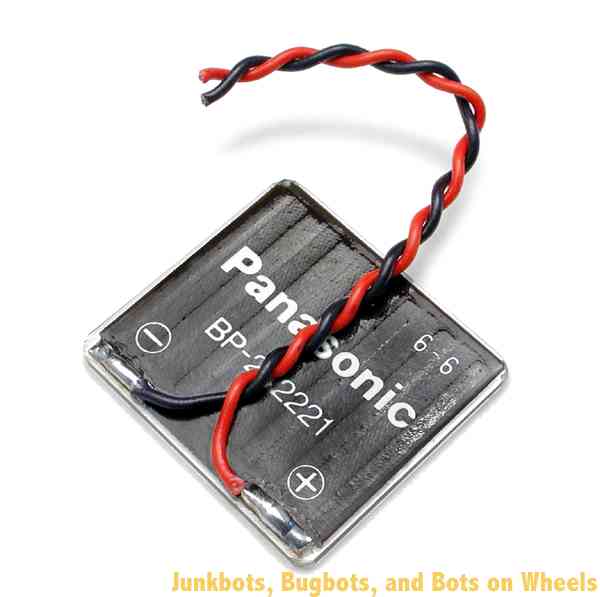 Figure 14: Soldering and gluing wires to the solar cell Figure 14: Soldering and gluing wires to the solar cell | |
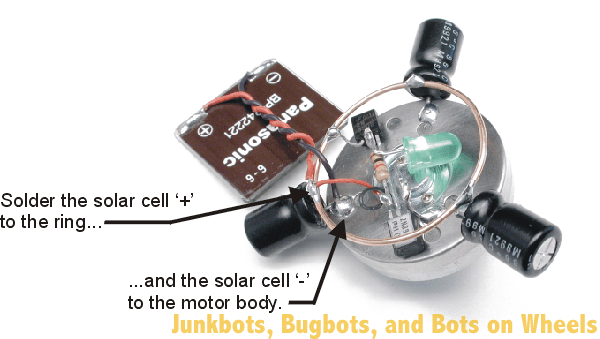 Figure 15: Soldering the solar cell to the Symet Figure 15: Soldering the solar cell to the Symet | You’re getting close to completion—just have to connect the motor and the solar cell, and your Symet should leap to life, do a song and dance, and throw confetti in the air. Either that, or it should occasionally twitch, moving in one direction until it bumps into something. Solder the red (+) wire from the solar cell to the connecting ring that joins all the capacitor “+” leads together. The black wire from the solar cell gets connected to the motor body. You can cheat a bit here, and solder this black wire to one of the same spots you did earlier for the capacitor “–” connections. | |
| One of the motor wires gets soldered to the left lead (collector) of the 2N3904 / PN2222 transistor, and the other wire gets soldered to the capacitor connecting ring. It doesn’t matter much which wire connects where, as it only will change the direction of motor rotation, and since this is a symmetrical robot, it doesn’t have any effect on how the Symet moves. | 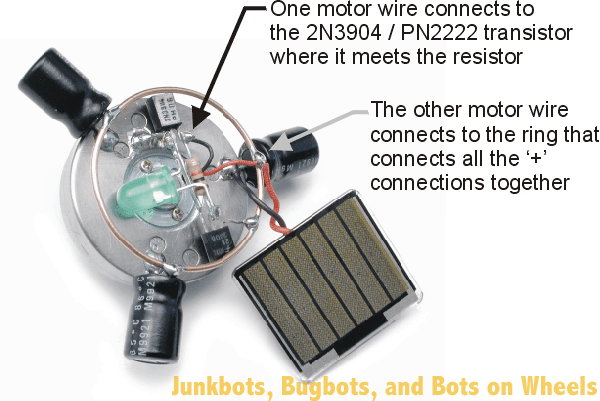 Figure 16: Soldering the motor wire connections Figure 16: Soldering the motor wire connections | |
| If your Symet twitches after lying in the light for a few seconds, you’re ready to hot-glue the solar cell down to the top of the solarengine circuit. If it isn’t…well, it’s time to go back to the troubleshooting section to see what could be the problem. With “freeform” circuits, you run the risk of making accidental electrical connections because there are so many bare wires close together. Make sure you don’t smoosh wires or component leads together accidentally! | ||
Care and Feeding of Your Symet | ||
| Like most solar-powered BEAM critters, it’s best kept in a pen with a hard, flat surface and walls high enough to keep it contained. Symets are cool little devices that love to ricochet around their environment, so they make great self-mobile plants for any robot display area. If you find that your Symet isn’t quite tipping over enough to keep it out of trouble, try adding a second, larger ring (it doesn’t have to replace the one you already soldered in to the capacitors), and add a plastic sleeve to the motor shaft to add traction. At your local electronics outlet, you’ll find neat material called heat-shrink tubing that once heated, shrinks down in size. This stuff is ideal for making friction sleeves on motors. In a pinch, cut a 1/4-inch slice of pencil eraser and press it on the motor shaft as a friction wheel. Another technique is to use a blob of hot glue on the end of the motor shaft. It works well but tends to leave little plastic streaks on the surface of your robot pen. | ||
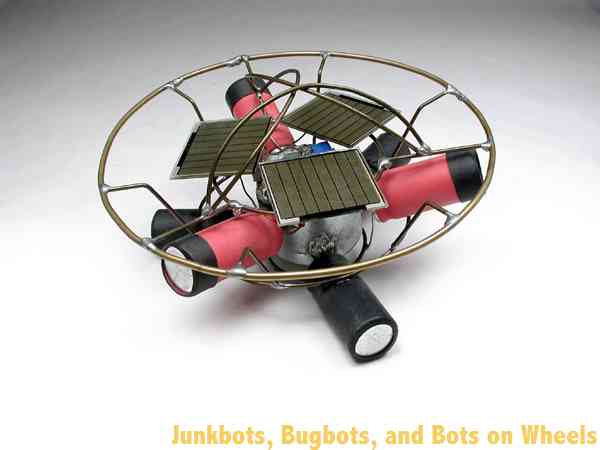 Figure 17: “Behemoth,” the monster Symet by Grant McKee Figure 17: “Behemoth,” the monster Symet by Grant McKee | Symets can be built in many sizes and configurations. One of the largest ever built is “Behemoth,” by Grant McKee. This monster measures 14cm (5.5”) across, uses a high-quality cassette deck motor, is powered by 16.5 volts from three solar cells and travels 15cm (6”) in a burst. McKee has plans for an even bigger that should be able to survive outdoors in a grassy backyard! | |
| Another interesting Symet was built at a BEAM workshop in 2002 by Adam and Zachary Aronson. This Symet was fit inside a computer mouse body, and has four coaster wheels on the bottom. By having the drive motor in the middle pointing straight down and two coaster wheels on each side, this Symet can move forwards and backwards. The paperclip on each end of the mouse is designed to tilt the Symet to it’s other side, making it scurry away from whatever hit the paperclip. | 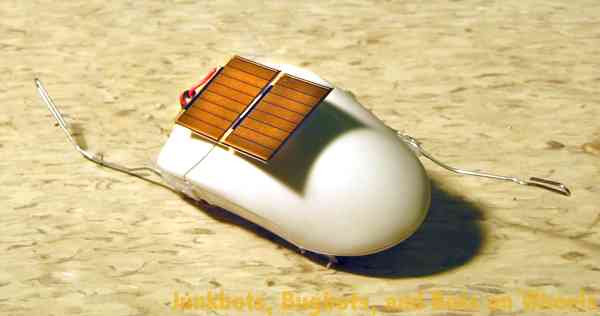 Figure 18: The Aronson mouse Symet Figure 18: The Aronson mouse Symet | |
| Experiment with your devices—since you built it, you’re the best person to make modifications! | ||

No comments:
Post a Comment